

Form 2290 VIN Correction Online
Entered the wrong Vehicle Identification Number on your Form 2290? If the IRS has already accepted the return, you can file a Form 2290 VIN correction to update the VIN shown on your Schedule 1.
Truck2290 is an IRS-authorized Form 2290 e-file provider. Use Truck2290 to submit your VIN correction electronically and receive an updated IRS-watermarked Schedule 1 after the IRS accepts the correction.
What Is a Form 2290 VIN Correction?
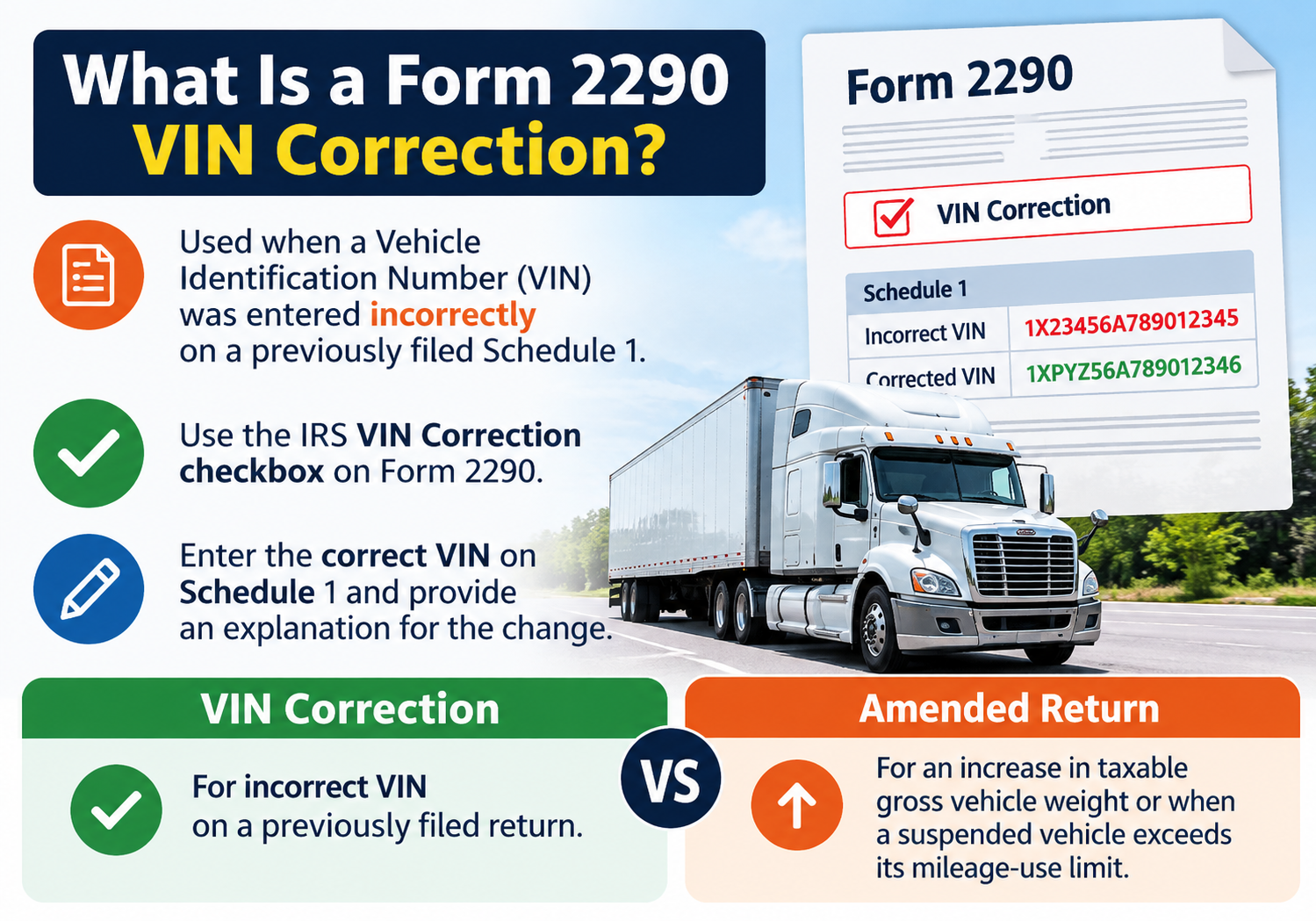
A Form 2290 VIN correction is used when a Vehicle Identification Number was entered incorrectly on a previously filed Schedule 1.
The IRS provides a dedicated VIN Correction checkbox on Form 2290. You enter the corrected VIN on Schedule 1 and provide an explanation for the change. You also need to use the Form 2290 for the tax period that contains the VIN you are correcting.
A VIN correction is different from a Form 2290 amended return. The IRS uses the Amended Return option for an increase in taxable gross vehicle weight or when a suspended vehicle exceeds its mileage-use limit.
What Is a Form 2290 VIN Correction?
A Form 2290 VIN correction is used when a Vehicle Identification Number was entered incorrectly on a previously filed Schedule 1.
The IRS provides a dedicated VIN Correction checkbox on Form 2290. You enter the corrected VIN on Schedule 1 and provide an explanation for the change. You also need to use the Form 2290 for the tax period that contains the VIN you are correcting
A VIN correction is different from a Form 2290 amended return. The IRS uses the Amended Return option for an increase in taxable gross vehicle weight or when a suspended vehicle exceeds its mileage-use limit.
When Do You Need a 2290 VIN Correction?
File a VIN correction when:
-
You entered an incorrect VIN on Form 2290.
-
The incorrect VIN appears on your previously filed Schedule 1
-
The IRS has already accepted the return containing the incorrect VIN.
-
You need the corrected VIN reflected on your Schedule 1.
If the IRS rejected your original electronic return because of incorrect information,correct the error and resubmit that return. A VIN correction applies when you need to correct a VIN reported on a previously filed and accepted return.
VIN Correction or Form 2290 Amendment?
Choosing the correct filing type depends on what changed.
| Filing situation | Filing type |
|---|---|
| Incorrect VIN on a previously filed Schedule 1 | VIN Correction |
| Taxable gross vehicle weight increased | Amended Return |
| March 2026 | Suspended vehicle exceeded its mileage-use limit |
| Amended Return | Original electronic return was rejected because of an error |
| May 2026 | Correct and resubmit the original return |
The IRS specifically states that the Amended Return checkbox is not used solely to correct a VIN.
What Information Do You Need for a VIN Correction?
Keep the information from your original Form 2290 available before starting your correction.
You generally need:
- Your Employer Identification Number (EIN)
- Business name and filing information
- The tax period for the previously filed return
- The incorrect VIN reported previously
- The correct VIN
- An explanation of why the VIN is being corrected
- Your previously filed Schedule 1 for reference
How to File a Form 2290 VIN Correction Online with Truck2290
If your original return was filed through Truck2290, you can start your VIN correction from your account.
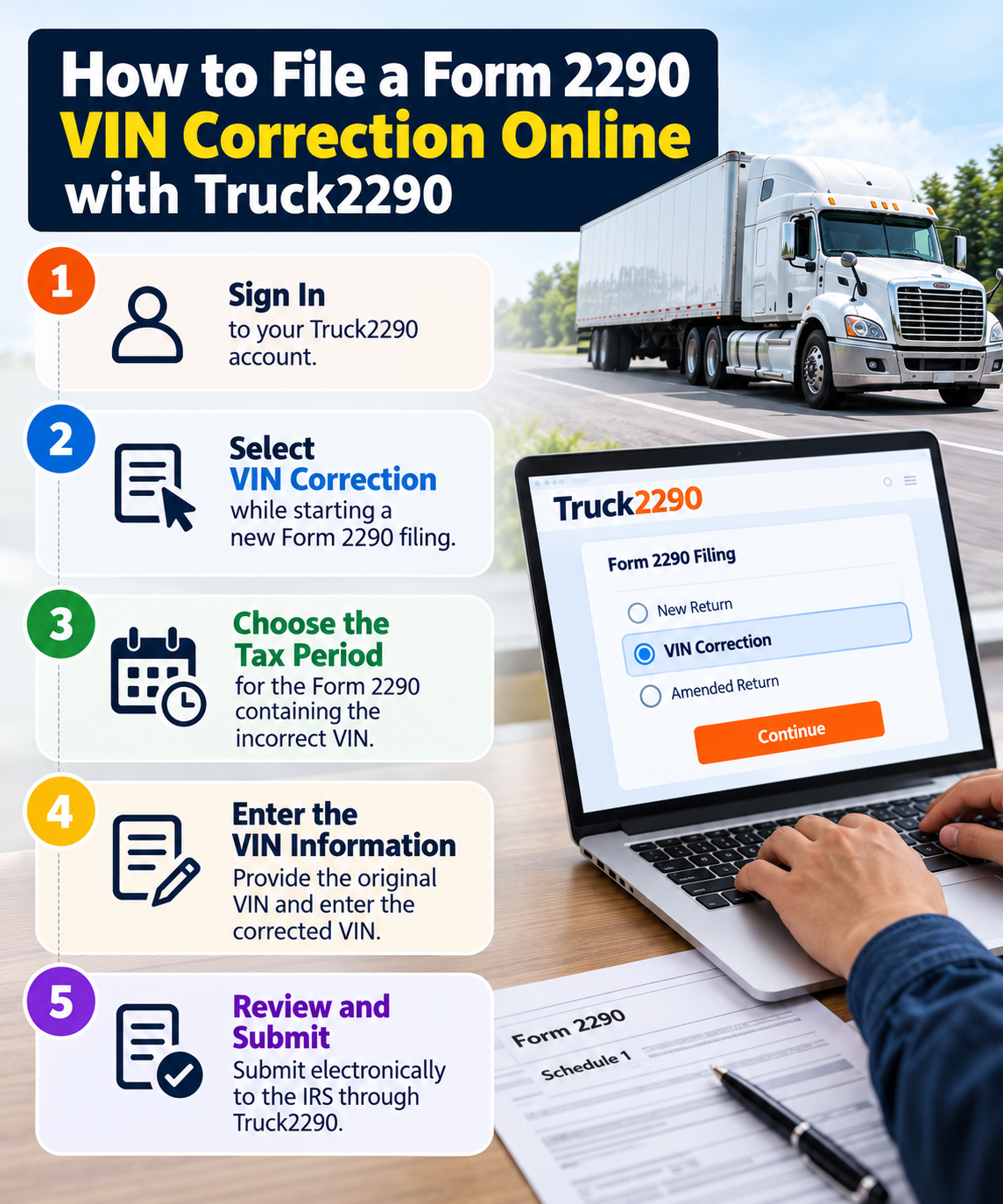
Step 1: Sign In to Truck2290
Log in to your Truck2290 account using your existing account information.
Step 2: Select VIN Correction
Start a new Form 2290 filing and select VIN Correction under the available correction or amendment options.
Step 3: Choose the Tax Period
Select the tax period for the Form 2290 containing the incorrect VIN. The IRS requires you to use the tax period associated with the VIN you are correcting.
Step 4: Enter the VIN Information
Provide the VIN originally reported and enter the corrected VIN carefully. Review the VIN against your vehicle records before continuing.
Step 5: Review and Submit
Review the correction and submit it electronically to the IRS through Truck2290. After the IRS accepts the filing, you can receive the Schedule 1 reflecting the corrected VIN.
What Happens After You Submit a VIN Correction?
Truck2290 transmits your VIN correction electronically to the IRS.
After IRS acceptance, the electronic Schedule 1 includes an IRS watermark. The IRS recognizes the watermarked Schedule 1 returned through an e-file provider as your electronic Schedule 1.
Why Is the Correct VIN Important on Schedule 1?
Schedule 1 lists the vehicles reported with your Form 2290. The IRS instructions state that failure to include the full VIN can prevent vehicle registration with a state. Schedule 1 is also used as proof of Heavy Highway Vehicle Use Tax payment when applicable.
Schedule 1 is also used as proof of Heavy Highway Vehicle Use Tax payment when applicable.
A VIN is generally a 17-character combination of letters and numbers for vehicles manufactured after September 1980. Because each character identifies the vehicle, even a typing or transposition error can result in the wrong VIN appearing on your tax record.
Where Can You Find Your Vehicle Identification Number?
Before entering the corrected VIN, check it against an official vehicle record. Depending on the vehicle, you can commonly find the VIN on:
- Vehicle registration documents
- Insurance documents
- The dashboard near the windshield
- A manufacturer label or plate near the driver’s door area
- Vehicle purchase documents
Is There a Deadline for a Form 2290 VIN Correction?
The current IRS Form 2290 instructions do not provide a separate filing deadline specifically for a VIN correction.
However, correcting the VIN after you discover the error helps keep the VIN on your Schedule 1 consistent with your vehicle records, particularly when you need Schedule 1 for vehicle registration.
Frequently Asked Questions
What is a Form 2290 VIN correction?
A Form 2290 VIN correction updates an incorrect Vehicle Identification Number listed on a previously filed Schedule 1. Use the VIN Correction filing option, enter the corrected VIN, and provide an explanation for the change.
What if my original Form 2290 was rejected because the VIN was wrong?
Correct the VIN and resubmit the rejected return. The VIN correction process is used for VINs reported on a previously filed and accepted Schedule 1.
Do I have to pay HVUT again when correcting a VIN?
A VIN-only correction addresses the vehicle identification number. It is separate from amendments involving increased taxable gross vehicle weight or exceeding the suspended-vehicle mileage limit.
Will I receive a corrected Schedule 1?
After the IRS accepts an electronically filed Form 2290 submission, the e-file provider receives the electronic IRS-watermarked Schedule 1. Truck2290 provides the Schedule 1 associated with the accepted filing
File Your VIN Correction with Truck2290
A mistyped VIN does not require you to start your entire Form 2290 filing again after the return has already been accepted.
With Truck2290, you can correct an incorrect VIN electronically and submit the change to the IRS. Truck2290 currently provides free VIN corrections for eligible previously filed Form 2290 returns, including returns originally filed through Truck2290.
Review the original VIN, enter the correct vehicle information, and submit your VIN correction online.